Dream Journal Planner KDP: A Detailed Evaluation for Self-Publishers
For anyone exploring the niche of dream interpretation and personal reflection on Amazon Kindle Direct Publishing (KDP), finding the right interior file can make or break a project. The Dream Journal Planner KDP is a pre-designed, fully editable book interior template created specifically for selling dream journals on the platform. Rather than building a layout from scratch or worrying about KDP’s strict formatting guidelines, you get a ready-made solution that promises to streamline the publishing process.
This article examines what this product actually includes, why someone might choose it, and where its strengths and limitations lie. Whether you are a first-time KDP publisher, a coach branching into guided journals, or simply someone researching low-content book interiors, understanding these tradeoffs will help you decide if it aligns with your needs.
What Exactly Is the Dream Journal Planner KDP?
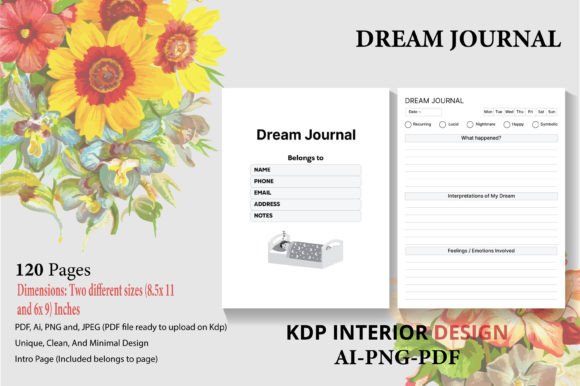
At its core, the offering is a collection of print-ready and editable design files for a 120-page dream journal. The interior has been tested on KDP to pass automated checks without errors—a crucial detail for anyone who has wrestled with margin warnings or file rejection. It comes in two popular trim sizes, 8.5″ x 11″ and 6″ x 9″, giving you the flexibility to target different customer preferences or create a series.
The package typically bundles multiple file formats: high-quality PDFs ready for direct upload, transparent PNGs, an AI (Adobe Illustrator) source file, and JPEG versions. Because an intro page is included and the design uses no bleed, the final printed book will start cleanly without content running to the edge of the page. The editable source file is a standout feature—it allows you to change fonts, colors, or add your own branding before export, even if the base layout remains unchanged.
Key Features at a Glance
- Formats: PDF, PNG, AI, and JPEG files
- Sizes: 8.5” x 11” and 6” x 9” (both included)
- Page count: 120 pages
- Bleed: No bleed design, eliminating margin surprises
- Intro page: Included, pre-formatted
- KDP compatibility: Tested and error-free upload-ready PDFs
- Editability: Layered AI source file for deeper customization
Who Is This Interior Designed For?
The primary audience is KDP self-publishers who want to create a dream journal to sell. This includes complete beginners intimidated by design software, experienced sellers speed-launching new low-content titles, and coaches or therapists who want a branded tool with minimal upfront effort. Instead of hiring a costly designer or learning InDesign from scratch, they can purchase the template, make light edits, and upload it quickly.
It may also appeal to someone wanting a high-quality dream journal for personal use—perhaps a bulk order printed through KDP’s author copies. However, the commercial-ready nature and editable source files are clearly built with resale in mind.
Time and Effort Savings
Designing a 120-page journal from a blank canvas is tedious. You need to set up margins, create a repeating page layout, ensure page numbers are correct, and verify everything prints properly. The Dream Journal Planner KDP hands you a finished framework. You can go from purchase to uploaded book in hours rather than days. For high-volume publishers, this speed directly translates into more titles on the marketplace.
Print-Ready and KDP Tested Reliability
One of the biggest hurdles for new KDP creators is getting the interior file accepted without technical rejections. A template that has already been tested reduces the risk of “bleed exceeds margins” or “elements outside printable area” errors. The fact that these PDFs are explicitly marked as KDP tested means you can be more confident the file will not trigger automated flags, saving time and frustration.
Customization Potential Through Editable Source Files
The inclusion of an AI file is a meaningful differentiator. While the ready-to-go PDF is convenient, the editable source gives you agency. You might change the header font to match a series you’re building, swap the intro page text, or adjust the line spacing to fit more writing room. Having the layered file means you are not locked into someone else’s exact visual identity, even though you start from their proven structure.
Considerations and Potential Drawbacks
No template is perfect for every goal, and there are a few tradeoffs worth weighing. First, because this is a commercial product sold to multiple buyers, the core layout may appear in several other dream journals on Amazon. If you upload the interior with only minimal changes, your book could look almost identical to a competitor’s listing, which might affect perceived uniqueness and brand recognition. Differentiation requires you to put in some editing work.
Second, although the AI source file is provided, taking full advantage of it does require basic familiarity with vector editing software. If you have never used Adobe Illustrator, you may need to invest a little time learning, or you may stick to the static PDF and accept the default look. Third, while 120 pages is a solid length, some creators might prefer a shorter journal (e.g., 100 pages) to reduce printing costs or a longer one with more sections. The page count is fixed; you cannot easily add or remove pages without reconstructing the file.
Lastly, the no-bleed design simplifies formatting but limits some decorative options. If you envisioned images or color blocks stretching to the edge of the page, this interior won’t support that without significant rework—and adding bleed could introduce upload complications.
Situations Where Dream Journal Planner KDP Shines
- You want a fast, low-risk entry into the dream journal niche. The tested files drastically lower the barrier to publishing.
- You lack advanced design skills but need a professional result. Even the unedited version looks clean and intentional.
- You plan to create multiple sizes. Having both 8.5×11 and 6×9 formats included means you can list two editions or test which trim size sells better.
- You value editable source files but don’t have time to build from scratch. Small branding tweaks can be applied without months of learning.
- You have been burned by KDP formatting errors before. The “no error” guarantee provides peace of mind.
When an Alternative Might Serve You Better
- You want a completely unique, one-of-a-kind journal design. Starting from a custom-commissioned layout or building your own in Canva or Adobe InDesign might yield a more distinctive product.
- You need complex interactive elements, trackers, or multiple distinct page styles throughout the journal. A static 120-page repeating interior cannot accommodate varied sections without heavy modification.
- Your brand relies heavily on a specific color palette or line-art style that the template does not match. While editable, fundamentally changing the entire aesthetic might be more work than creating fresh.
- You are only printing a single copy for personal use. In that case, you might find equally attractive, free or lower-cost dream journal printables elsewhere, though you would lose the commercial license and KDP upload readiness.
- You expect to publish a journal that requires bleed (e.g., edge-to-edge backgrounds). This no-bleed template may limit your creative vision.
Practical Tips for Making an Informed Decision
Before you commit to this or any KDP interior template, clarify your own publishing goals. Ask yourself whether speed or absolute uniqueness is more important for this particular journal. If you are testing a new niche, a ready-made interior can help you validate demand without a large upfront design investment. If you are building a recognizable brand with a cohesive series of journals, factor in the editing effort required to make the template distinctly yours.
Check the specific license terms of the Dream Journal Planner KDP you are considering. Some template sellers allow full commercial use with no attribution; others might restrict the number of books sold or require modifications before resale. Verifying this prevents headaches later. Also, review sample pages if available—look at the line spacing, dream prompt text, and intro page layout to ensure they match the tone you want to convey.
If you decide to buy, start with a small test. Upload the PDF to KDP and use the online previewer to flip through every page on a few different devices. Even a pre-tested file can behave differently depending on Amazon’s current processing engine, so a quick check is always smart. When using the editable files, save a backup of the original before you start tinkering, so you can always revert if needed.
Weighing the Dream Journal Planner KDP Against Your Publishing Needs
The Dream Journal Planner KDP occupies a practical middle ground for self-publishers. It does not offer the limitless creative freedom of a completely custom design, but it removes most of the technical and time-consuming barriers that stop people from publishing altogether. The inclusion of two sizes, multiple file formats, and an editable AI source makes it a versatile starting point—especially if you are willing to customize and add your own voice to the finished product.
If speed, reliability, and a solid foundation matter more to you than extreme originality, this interior can be a worthwhile asset. If you dream of a journal that is unmistakably yours from the very first page, you may need a more tailored approach. Ultimately, the right choice hinges on how you balance efficiency against creative control, and how much you are willing to reshape an existing template into something that feels like your own.