Organize Your Life With a Daily Planner KDP
Staying on top of daily tasks can feel overwhelming when thoughts, appointments, and goals all compete for attention. A well-structured tool often makes the difference between a scattered day and one that flows smoothly. This is a Daily Planner KDP designed to bring clarity and consistency without unnecessary complexity. It offers a clean framework that helps you focus on what matters most, whether you are mapping out business projects, personal milestones, or creative ideas.
What makes this planner stand out is its balance of simplicity and thoughtful design. Instead of cluttered layouts, you get a page-by-page structure that encourages a steady rhythm. Each spread gives you room to breathe while keeping priorities visible. The concept behind a Daily Planner KDP is rooted in making organization feel approachable, not like another chore. For beginners and seasoned planners alike, the format removes friction and invites consistent use.
What a Daily Planner KDP Actually Offers
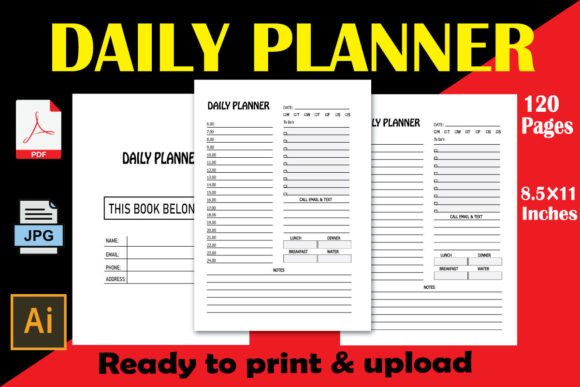
At its core, this Daily Planner KDP is a downloadable set of 100 pages, each formatted to an 8.5″ x 11″ dimension at 300 DPI. The resolution ensures crisp lines and a professional look when printed. Because it comes as a print-ready PDF file, you can produce a physical copy in minutes or upload the file directly to Kindle Direct Publishing with no extra formatting headaches. An editable source file accompanies the package, which means you can adjust sections or add personal branding before finalizing.
The inclusion of JPG and PNG files further expands how you can use the planner. Insert individual pages into digital notebooks, use them as templates in apps like GoodNotes, or print select sheets for a one-off planning session. Designers, coaches, and small business owners often value this flexibility because it allows them to tailor the experience for themselves or their audience. With no bleed setting required, printing at home or through a professional service stays straightforward.
Why 100 Pages Hits the Sweet Spot
Choosing a page count can be tricky. Too few pages and the planner runs out when momentum is building. Too many and it might feel daunting. One hundred pages offer a substantial runway without overwhelming you. This length suits a focused quarter of planning, a project-based timeline, or a compact daily companion you can realistically finish. Many people find that reaching the final page of a Daily Planner KDP brings a genuine sense of accomplishment, reinforcing the habit.
For creators planning to sell on KDP, 100 pages keeps printing costs manageable while delivering a product that buyers perceive as valuable. The page extent also pairs well with the 8.5″ x 11″ format, creating a substantial feel without excessive bulk. Content creators and coaches often bundle such planners with courses or challenges, knowing the page count aligns nicely with a 90-day or 100-day program structure.
Practical Ways the Unique Design Supports Daily Use
The term unique design matters here because many planners overcomplicate layouts. This one takes a cleaner route. Ample white space prevents visual fatigue, letting your handwriting or digital annotations stand out. Sections typically flow from a date area into priority slots, with room for notes, reflections, or gratitude prompts depending on the variation you choose. The absence of bleed means every line and margin stays intact, even after trimming, which is especially important for self-publishers who need fuss-free formatting.
Entrepreneurs might use the daily pages to separate client tasks from personal errands. Educators can outline lesson prep, follow-ups, and self-care check-ins side by side. A freelance writer could block morning deep work, midday revisions, and evening reading, all within a single coherent layout. The adaptability of a Daily Planner KDP comes from its restraint—it gives structure without dictating exactly how you must fill it.
How the File Formats Unlock Different Workflows
Having PDF, AI, JPEG, and PNG files in one package solves multiple problems at once. The PDF is ready for instant download and KDP upload, sparing you from technical guesswork. The AI editable source file opens the door for advanced customization: swap fonts, add brand colors, or insert logo elements. JPEG and PNG files give you the freedom to pull individual pages into presentations, social media graphics, or digital planning apps.
Here are a few realistic ways people combine these assets:
- Digital planning: Import PNG pages into a tablet app and handwrite notes with a stylus.
- Client resources: Coaches distribute selected JPEG pages as printable handouts during workshops.
- Content creation: Marketers share a filled planner page on social media to illustrate a productivity tip.
- Hybrid systems: Print the full planner for daily desk use while keeping a digital backup for on-the-go reference.
Juggling multiple formats might seem unnecessary at first, but once you experience the freedom of adapting a single planner to multiple contexts, the value becomes clear. A small business owner might print the full PDF for personal accountability while using PNG snippets inside a Notion dashboard for team check-ins.
What to Consider Before Using or Selling This Planner
While this is a ready-to-go product, a few considerations help you get the most from it. First, think about your binding method. With 100 pages at 8.5″ x 11″, spiral binding, discbound systems, or simple three-hole punches all work well. If you plan to sell on KDP, no-bleed formatting simplifies Amazon's print requirements, but always review a physical proof to ensure alignment meets your expectations.
Second, evaluate the paper quality you intend to use. The 300 DPI resolution means your print files are sharp, but the final feel depends on paper weight and texture. For a premium planner experience, thicker paper prevents ink ghosting and adds durability. If you're offering the planner as a digital download, let buyers know what paper stock performs best so they feel supported.
Third, consider how the editable source file figures into your workflow. Editing in Adobe Illustrator requires some familiarity with vector software. Beginners might prefer starting with the ready-made PDF and adjusting only if necessary. Small business owners, however, may appreciate the editable file for adding a custom cover page, contact information, or branded instructions before distributing internally.
Who Benefits Most From a Daily Planner KDP
The audience spans a broad spectrum, but certain groups find particularly strong alignment with this format. Freelancers managing multiple gigs benefit from the daily focus that prevents tasks from bleeding together. Hobbyists pursuing creative skills can track practice sessions, inspirations, and mini-milestones. Bloggers and marketers schedule content deadlines alongside idea notes, bridging creative and logistical needs seamlessly.
Students and educators represent another natural fit. The daily page structure encourages breaking large assignments into manageable actions without losing sight of long-term deadlines. A teacher might plan lessons, note student follow-ups, and still carve out space for personal reflection. The 8.5″ x 11″ size gives enough room for detailed handwriting, which many smaller planners lack.
Even casual users looking for a gentle introduction to planning will find this Daily Planner KDP approachable. There is no overwhelming habit tracker spread or elaborate goal-mapping section to intimidate. You simply show up each day, fill the page, and build momentum naturally. That low barrier to entry often leads to longer-lasting routines because the planner supports rather than demands.
Using the Planner Across Different Environments
Physical planners tend to live on desks, but this one travels well too. Coaches bring printed pages to in-person sessions, using them as visual tools to map client action steps. Remote workers keep the PDF open on a second monitor, treating it like a dynamic to-do hub. Parents juggling family schedules print a fresh sheet each morning from the JPG files, pinning it to the fridge for everyone to see.
Other practical applications include:
- Event planning: Map daily tasks leading up to a wedding, workshop, or product launch.
- Health tracking: Log meals, movement, and mood alongside daily priorities without needing a separate journal.
- Learning sprints: Dedicate 100 days to a new skill, using each page to note progress, struggles, and next steps.
- Team alignment: Start meetings by reviewing yesterday's completed items and setting today's focus using a shared planner layout.
The versatility comes from the underlying format rather than any single niche feature. Because the planner doesn't over-specialize, you can shape it around your current season of life. That adaptability is one reason products like this Daily Planner KDP resonate with such a wide age range and experience level.
Making the Most of the Instant Download Advantage
Waiting for shipping can dampen planning motivation. An instant download removes that delay. Within moments of purchase, you have the print PDF and supplementary files ready. This immediacy supports last-minute gift ideas, quick business pivots, or sudden bursts of organizational inspiration. For KDP sellers, having a ready-to-upload file shortens time to market considerably. You can focus on cover design and listing optimization rather than interior layout.
The editable source file also opens doors for creating variants. Perhaps you want a version with morning gratitude prompts, another with evening reflection boxes, or a set of pages tailored to a specific profession. Having AI files means you can develop a whole product line from a single foundation. Educators and coaches often create themed planners for students or clients this way, adding relevant prompts while keeping the core structure intact.
Remember that while customization is powerful, the base design already works well for most use cases. If you feel uncertain about editing software, trust the existing layout. Many users report that sticking with the original Daily Planner KDP design brings a sense of ease because they're not endlessly tweaking—they're simply doing.
For those new to KDP publishing, this bundle lowers the entry barrier substantially. Instead of wrestling with trim sizes, margins, and resolution specs, you receive a file built to Amazon's requirements. The 300 DPI resolution and no-bleed setup align with KDP's guidelines, reducing the risk of rejection during the upload process. Small business owners and beginner publishers can launch a physical product with confidence, knowing the technical foundation is solid.
Ultimately, what makes this Daily Planner KDP meaningful is how it supports real, daily progress. The combination of 100 pages, spacious dimensions, multiple file formats, and an editable source file creates a tool that adapts rather than dictates. Whether you're printing a personal copy, building a digital planning system, or publishing on KDP, the resources are in place to move from intention to consistent action.