Stay on Top of Every Agenda with Meeting Notes & Project Planner
Modern work moves fast. Between back-to-back virtual calls, sprawling project timelines, and the constant ping of new tasks, trying to keep everything in your head is a recipe for chaos. That’s exactly where a structured, repeatable system makes all the difference. The Meeting Notes Planner and Project Planner collection isn’t just another stack of printable pages—it’s a carefully considered toolkit designed to turn scattered thoughts into clear action. Whether you’re leading a client workshop, coordinating a remote team, or simply trying to tame your own weekly to-do list, these pages help you capture what matters, assign ownership, and follow through without friction. The minimalist design and thoughtful layout take the guesswork out of documentation so you can focus on the conversation and the work that comes next.
A Design That Disappears So Thinking Can Happen
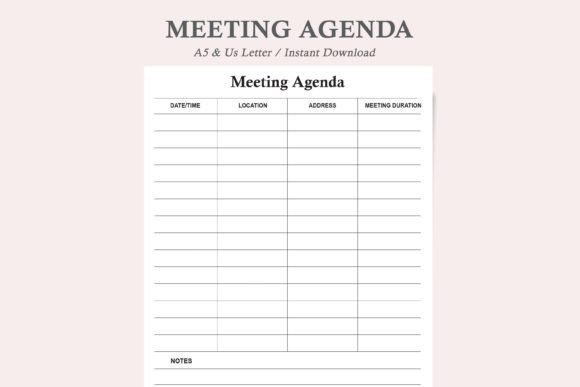
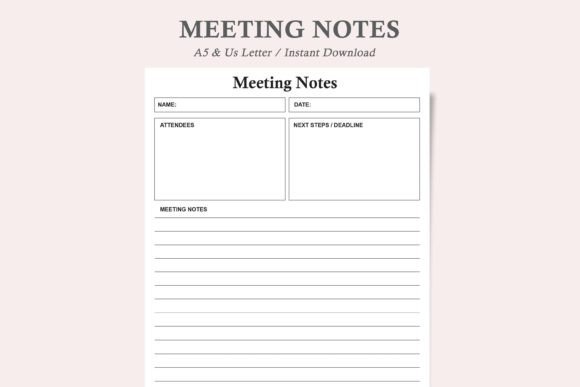
Open any page in the Meeting Notes Planner suite and you’ll notice what’s not there: no loud borders, no heavy graphics, no wasted ink. The aesthetic is deliberately quiet—clean lines, generous white space, and a logical visual rhythm that guides your eye from one section to the next. This kind of restraint is intentional. When you’re scribbling notes during a fast-paced discussion, a cluttered page adds cognitive noise. Here, every element has a job. Date fields, attendee lists, discussion points, action items, and decision logs are clearly separated, often using a subtle hierarchy of thin rules and slightly bolder headers. The result feels less like a generic notebook and more like a bespoke productivity instrument, one that brings calm to the storm of a packed workday.
The collection covers multiple use cases within a single coherent visual language. Two sizes (US letter and A5) let you pick the canvas that matches your workflow—full-page binders for project command centers or compact A5 sheets for on-the-go capture. Inside, you’ll find dedicated templates: a Meeting Minutes Template for formal decision tracking, a Project Planner for breaking down milestones into manageable chunks, an Office Planner for daily priorities, and even a Zoom Planner that acknowledges the unique rhythm of virtual meetings. Despite serving different functions, all pages share the same typeface, grid logic, and monochrome palette. That consistency turns a loose assortment of printables into a true system, one that feels cohesive whether you’re flicking between a client meeting and a project retrospective.
The Quiet Power of Modern Typography in Everyday Planning
Peel back the surface and you’ll find that the planner’s usability leans heavily on typographic choices often associated with high-end editorial design. The template uses a clean sans serif font that remains crisp at small sizes and on less-than-perfect printer paper. The x-height is generous, so even rushed handwriting next to a printed prompt stays legible. Headers and labels employ a slightly weightier variant to create a gentle but effective visual hierarchy—your brain instantly knows where the key information lives without needing decorative cues. It’s a prime example of how intentional font pairing can shape behavior: the type anchors you, then steps back to let your own notes take center stage.
For designers, entrepreneurs, and creative professionals who obsess over their tools, this thoughtful treatment matters. A poorly typeset worksheet can feel amateurish and undermine the seriousness you bring to a client engagement. In contrast, the restrained typeface used throughout the Meeting Notes Planner and Project Planner conveys competence and attention to detail. It aligns with the kind of considered brand identity many small business owners are building, extending that same polish to the internal documents that keep their operations running smoothly. Even if nobody else ever sees your planner, the clarity it brings to your own thinking is worth the investment. And if a colleague catches a glimpse of your bound set of neatly organised minutes, it quietly signals that you run a tight ship.
Where the Planner Proves Its Worth Across Creative and Commercial Roles
The beauty of a system built around clear information architecture is that it adapts to wildly different contexts. In a marketing agency, the Meeting Notes Planner becomes a place to capture campaign feedback, tag decision-makers, and log next steps without letting a single insight slip. For bloggers and content creators mapping out quarterly editorial calendars, the Project Planner template offers a bird’s-eye view of deadlines and asset needs, while the meeting sheets can document sponsorship calls or collaborative brainstorm sessions. Crafters and makers who run small Etsy shops use the Office Planner to balance production schedules with admin tasks, and the Zoom Planner ensures their virtual craft-alongs or client consultations stay on track. Across all these scenarios, the common thread is a need to move from discussion to execution with as little friction as possible.
- Remote teams: Use the Zoom Planner template to outline talking points, document screen-share notes, and assign digital follow-ups before the call even ends.
- Freelancers and consultants: Keep a master binder where the Meeting Minutes Template tracks client approvals and the Project Planner visualizes multi-month retainers.
- Publishing and editorial work: Map issue themes, contributor deadlines, and editorial meeting outcomes in a format that mirrors the clarity of a well-designed magazine flatplan.
- Small business owners: Combine the Office Planner for daily ops and the Meeting Notes Planner for supplier negotiations, inventory reviews, and team stand-ups.
How a Consistent Template Reframes Accountability and Readability
There’s a psychological shift that happens when you repeat a structured note-taking ritual. The Meeting Notes Planner layout forces you to separate raw discussion from concrete action items and decisions, which means you leave the room (or close the video call) with a ready-to-distribute summary rather than a cryptic page of fragments. This discipline combats the all-too-common pattern of recapping meetings a day later and guessing what people actually agreed to. Because the template prints fresh every time, there’s no accumulating clutter—just a clean new sheet that invites you to start sharp. That feeling of a fresh start is especially powerful when projects get chaotic: instead of digging through a messy bullet journal, you pull a pristine Project Planner page and reset your headspace.
Readability also gets a boost from the monochrome palette and ink-friendly construction. Heavy fills and decorative borders are absent, which means home printers churn out pages faster and at lower cost. This matters when you’re printing dozens of sheets a month for a growing team. The neutral design also plays nicely with highlighter systems, colored pens, or washi tape accents without clashing. You can layer your own personality onto the page while the underlying structure keeps everything anchored. For many users, this blend of disciplined framework and personal expression hits the sweet spot that generic off-the-shelf planners miss.
Choosing and Adapting the Planner to Fit Your Workflow
Before you print a full stack, spend a few minutes thinking about how you actually work. If your days are heavy on external interactions—sales calls, stakeholder updates, partner check-ins—the Meeting Notes Planner and Zoom Planner templates will likely be your most-used sheets. If you’re driving a product launch or a complex creative project, the Project Planner should live at the front of your binder so you can track milestones at a glance. The digital PDF download format means you aren’t locked into a pre-printed volume. Experiment with printing a few of each template, testing different paper stocks, and seeing what sequence feels intuitive. Some people prefer to archive completed pages in a ring binder with tabs; others fold an A5 sheet into a pocket notebook for impromptu conversations. Because the Meeting Notes Planner files are reusable, you can iterate without waste.
Pay attention to the pens and pencils you pair with the template. The sans serif type holds up beautifully under a fine gel pen or a dark fountain pen ink, and the lightweight text doesn’t compete with handwritten annotations. If you’re left-handed and smudge-prone, try a quick-drying ballpoint. The layout’s generous spacing around headers and boxes also means your notes won’t feel cramped, even when you write in a hurry. These small details—often overlooked in mass-market planners—make a tangible difference in day-to-day satisfaction. Over time, you may find that the consistent structure actually improves your note-taking speed because you’re no longer reinventing a format each time you open a notebook.
Practical Ways to Extend the Value of Every Page
A few simple habits can turn this collection of design assets into a running command centre. First, try dating and numbering each sheet of your Meeting Notes Planner and keeping a simple index at the front of your binder. That way, when a six-month-old decision resurfaces, you can locate the relevant minutes in seconds. Second, consider using the Project Planner as a lightweight brain trust: break a large goal into tasks, assign estimated time blocks, and then review weekly to see what shifted. Because the printable format gives you unlimited copies, you can archive completed plans without sacrificing your current board. Third, if you collaborate with a virtual assistant or a co-founder, scan or photograph your filled pages and drop them into a shared cloud folder. The clean monochrome design photographs well and remains legible even on a phone screen.
For those who straddle analog and digital, this planner family bridges the gap gracefully. The Zoom Planner can be printed out before a call, filled in by hand, and then sent as a photo summary to participants via chat. The Office Planner can sit under your keyboard as a daily bridge between your physical desk and your digital task manager. These hybrid workflows honour the cognitive benefits of handwriting while still supporting the speed of digital distribution. It’s a flexible middle path that many creative professionals and entrepreneurs have been searching for as they step away from screen-only productivity methods.
Why a Quiet, Consistent System Wins Over Flashy Tools
In a world of bloated apps and overdesigned stationery, the Meeting Notes Planner and Project Planner collection stands out by staying out of the way. It doesn’t try to gamify your to-do list or seduce you with ornamental flourishes. Instead, it gives you a reliable framework rooted in solid usability principles: clear hierarchy, a readable sans serif font, and a layout that respects how work actually unfolds. This no-nonsense personality resonates particularly with those who’ve tried countless organizational methods and found that simplicity, consistently applied, beats complexity every time. The pages become a subtle anchor, reinforcing a sense of control even when project scopes creep and calendars double-book.
Small business owners will appreciate that the template’s professional appearance supports the brand identity they’re cultivating with every client touchpoint. Marketers and publishers will notice how the underlying grid shares DNA with strong editorial design layouts, making the transition from planning to producing content feel seamless. And anyone working from home will find that the dedicated Zoom Planner variant specifically addresses the quirks of remote communication: screen fatigue, multitasking temptation, and the need to share outcomes quickly. By covering these distinct scenarios within one cohesive visual system, the collection does what great design always does—it disappears into the background and elevates the work itself. That’s the quiet magic of a well-built planner.