How an Editable 2024 Monthly Planner Can Adapt to Your Real Schedule
Finding a planner that fits your life often means settling for something close enough. Pre-printed layouts come with fixed sections you may never use, while some digital tools feel impersonal or overly complex. An Editable 2024 Monthly Planner built inside a platform like Canva offers a middle path: you start with structured pages but keep the freedom to move, remove, or rework elements until they reflect how you actually plan. Understanding what this kind of resource does well and where its limits sit can help you decide if it matches the way you work.
What the Editable 2024 Monthly Planner Actually Contains
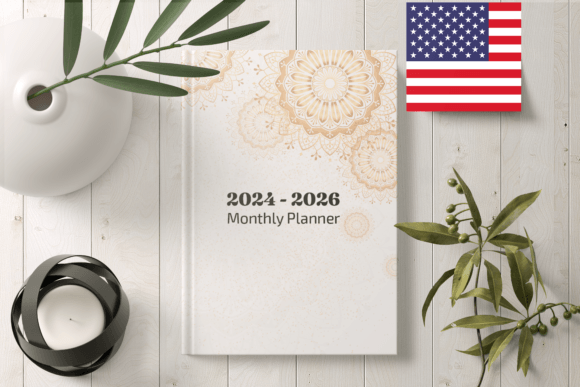
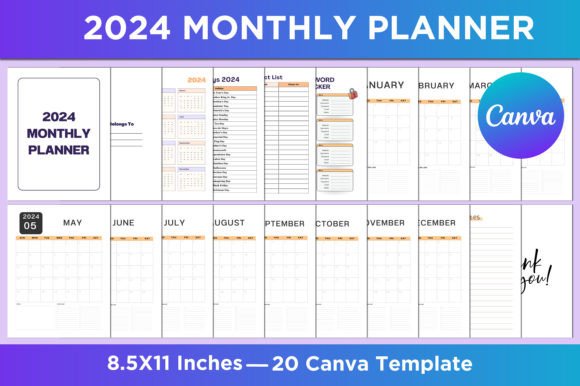
At its core, this planner is a set of 20 Canva templates laid out at 8.5 by 11 inches with no bleed and 300 DPI output. The pages cover familiar territory: a belongs-to page, a full 2024 calendar, a list of holidays, a contact directory, a password tracker, monthly spreads from January through December, notes pages, and a closing thank-you section. Files are delivered as ready-to-download JPG, PNG, and PDF formats alongside the editable Canva link itself.
The distinction matters because it is not a static PDF alone. You receive the source file inside Canva, which means every text field, color, font choice, and layout element can shift. If you do not need a password tracker, you delete that page. If you want to add a habit tracker or a meal-planning grid to every month, you can duplicate and adapt the existing blocks. The skeleton is there, but the skin is yours to change.
Comparing Editable Templates With Fixed Printables
Fixed printables arrive as a finished product. You download one file and print it as is. That simplicity carries weight for someone who wants a frictionless start. There is no software to learn, no temptation to tweak endlessly, and no risk of breaking a layout by accident. The tradeoff is rigidity. If you do not track passwords, that page still prints. If the font feels too small or the color palette clashes with your workspace, you live with it.
An Editable 2024 Monthly Planner flips that relationship. You control the outcome, but you also carry the responsibility of making choices. For some, that creative agency is the entire point. For others, it becomes a bottleneck. The comparison is not about which is objectively better but about whether you want to invest time customizing or prefer to accept a designer's finished vision.
Where Canva-Based Editing Changes the Planner Experience
Canva as an editing environment shapes what is practical. On the positive side, Canva runs in a browser, requires no software installation, and handles fonts, images, and alignment with drag-and-drop simplicity. You can change every month's header color to match a seasonal theme, insert personal photos on the cover, or adjust line spacing inside the notes pages. The learning curve stays relatively gentle compared to professional design tools.
The constraint is that Canva operates best with an internet connection. Offline editing is possible only through the mobile app with a premium subscription, and even then, certain features rely on cloud syncing. If you travel frequently or work in places with unreliable connectivity, a fully offline tool or a simple printable may cause fewer interruptions. The Editable 2024 Monthly Planner leans on Canva's strengths, but those strengths assume a reasonably connected workflow.
Print Quality and Format Choices Across Different Needs
The package includes JPG, PNG, and PDF output at 300 DPI, which covers most home and professional printing scenarios. PDF works best for standard printers and maintains layout integrity. JPG and PNG files give you the option to isolate specific pages for digital use—loading a single month into a note-taking app, for instance, or sharing a page with a family member.
Because the templates run at 8.5 by 11 inches with no bleed, they match standard US letter paper without requiring trimming. That no-bleed design simplifies home printing but means you lose the edge-to-edge color effect some planners use for a polished look. If you print through a service, the result will still feel clean and professional, though it may not have the fully wrapped cover appearance that bleeds enable. This is a practical tradeoff rather than a flaw—no bleed removes a production step many users prefer to skip.
Who Gets the Most Value From This Planner
Several situations align particularly well with an Editable 2024 Monthly Planner:
- You manage multiple roles and need different layouts for different contexts. A parent tracking school events, a freelancer managing project deadlines, and someone coordinating care for an aging relative might all start from the same template but shape it in three distinct directions.
- You have specific tracking needs beyond the standard setup. The included password tracker and contact list suggest a light life-management angle, but you can extend that logic. Add a bill payment log, a fitness tracker, or a reading list without needing a separate notebook.
- You already use Canva and feel comfortable with its tools. Familiarity reduces the friction of customization. If you have designed social media graphics or documents in Canva before, this planner will feel like familiar territory.
- You want to create a cohesive set of planning materials. Because you can edit everything, you can match the planner's visual style to other documents—meal plans, chore charts, budget trackers—giving your household or business a consistent look.
Situations Where a Different Approach May Serve You Better
The same features that make an editable planner appealing can become drawbacks under different conditions:
- You need to start using the planner immediately with zero setup. Customization takes time. If you are in the middle of a chaotic season and just need something functional today, a well-designed static printable or a pre-bound planner may reduce cognitive load.
- You lack reliable internet access. Canva's browser-based nature can frustrate users who work primarily offline. Dedicated PDF planners that run in local software or good old pen-and-paper books eliminate that dependency.
- You tend to over-customize and never finish. Some people find the endless editability paralyzing. They tweak fonts for weeks and never actually use the planner for its intended purpose. A fixed format enforces a useful stop point.
- You want a bound, physical product without printing. This is a digital file set. Getting it into your hands requires a printer or a print service. If you value the heft and durability of a professionally bound planner, starting from a printable file adds steps.
How Customization Shapes Daily and Monthly Planning Habits
Customization is not merely aesthetic. Changing which sections appear on a monthly spread can shift how you use the planner. If you add a weekly review box next to each month's calendar, you build a built-in prompt to pause and reflect. If you enlarge the notes section and shrink the contact list, you signal that reflection matters more than quick reference for your situation.
This flexibility lets the Editable 2024 Monthly Planner serve as a lightweight life dashboard rather than a passive calendar. The holiday list can become a birthday and anniversary tracker. The password tracker can convert into a subscription renewal log. Because you control the labels and data fields, the planner inherits your actual priorities rather than a designer's assumptions about what most people need.
The risk, however, is losing the benefits of constraints. A well-designed fixed planner forces you to engage with categories you might otherwise avoid—gratitude prompts, goal-setting sections, or weekly priorities. When you can delete anything uncomfortable, you might inadvertently remove the very structure that challenges you to grow. Balance comes from being honest about which sections truly do not apply and which ones feel inconvenient but valuable.
Digital Versus Printed Use and Hybrid Approaches
Many users never print the full planner. They load the PDF into a tablet annotation app like GoodNotes or Notability and use a stylus for handwriting. Others print only the monthly spreads and keep the contact list and password tracker as encrypted digital files. The Editable 2024 Monthly Planner supports this kind of hybrid use because you can export individual pages rather than the entire document.
Compare this to app-based planners that lock you into a single ecosystem. A dedicated planning app may offer superior search, reminders, and syncing across devices, but it rarely lets you print a clean physical copy. A paper-only planner cannot send you a notification. The editable template approach sits at a useful intersection: you stay in control of the output format, and you are not tied to any one platform beyond the initial editing stage.
Evaluating Whether Canva-Specific Templates Fit Your Workflow
Canva templates come with benefits and limitations that differ from other editable formats. Adobe InDesign or Affinity Publisher files offer more granular typographic control but demand significantly more skill. Microsoft Word or Google Docs templates feel familiar but often break layouts when you add text. Canva strikes a middle ground: more design control than a word processor, less complexity than professional layout software.
For the majority of personal planning needs, Canva's feature set is more than sufficient. You can adjust text, swap images, change colors, and rearrange elements easily. Where it may fall short is in highly specific typographic work—kerning, optical margin alignment, or complex paragraph styles—none of which matter for a functional monthly planner. The platform choice aligns well with the task.
Practical Steps for Making the Most of the Template Set
If you decide this type of planner fits your needs, a few practices can improve the outcome:
- Start with a quick paper sketch of what you want. Before opening Canva, list the pages and sections that matter most. Having a rough blueprint prevents endless digital tinkering.
- Customize one month first as a test. Print it, use it for a week, and note what works and what feels off. Adjust the template once before duplicating your changes across all twelve months.
- Keep the original file untouched. Duplicate the template before editing so you can always return to the starting point if something breaks or you want to create a different version later.
- Consider seasonal variants. Because you have full control, you can create a lighter, more open summer layout and a denser, more structured winter version within the same year.
Understanding the Long-Term Value of Reusable Templates
One underappreciated aspect of an editable planner built in Canva is that the customization skills you develop transfer forward. The time spent learning to modify this 2024 planner means the 2025 version—whether from the same source or a different one—will go faster. You build a reusable mental model of how planner layouts work, what you actually use, and how to adapt templates efficiently.
This stands in contrast to purchasing a new bound planner each year, where you start fresh with whatever layout the manufacturer chose for that cycle. With a template-based approach, you accumulate a personal library of layouts that reflect years of refinement. The Editable 2024 Monthly Planner can serve as a starting point for that longer-term practice rather than a one-off purchase.
Decision Factors to Weigh Before Purchasing
Several practical questions help clarify whether this planner aligns with your situation:
- Do you enjoy the process of personalizing a template, or does design work feel like a chore that delays actual planning?
- How consistently do you have internet access when you are likely to edit?
- Do you prefer printing at home, using a print service, or working entirely on a tablet?
- Are the included page types—monthly calendars, notes, contact list, password tracker—close enough to your needs, or would you need to rebuild most of the content from scratch?
- Does the 8.5-by-11-inch format match your preferred planner size, or are you looking for something pocket-sized or A5?
Answering these questions honestly tends to surface the right choice more reliably than feature lists or star ratings. An Editable 2024 Monthly Planner rewards users who want creative control and are willing to invest a modest amount of setup time. It tends to frustrate those who need immediacy or work heavily offline. Neither preference is wrong; they simply lead to different tools.
For the right person, having a set of well-structured templates with full editing access through Canva, ready output in multiple formats, and a clean 300 DPI print setup represents a genuinely useful resource. It does not try to be everything—it does not include weekly spreads, hourly scheduling, or advanced project management tools—but what it does offer is solid, adaptable, and refreshingly straightforward.