Online Shop Planner Canva Template
Running a successful online shop demands more than great products—it requires flawless organization, and that's exactly where an Online Shop Planner Canva Template transforms your workflow. Imagine having every critical business detail, from inventory levels to marketing campaigns, living inside one beautifully designed document you can tweak in minutes. This isn't just a planner; it's a professional visual system that brings clarity, consistency, and calm to your daily operations while strengthening your brand identity.
For creative entrepreneurs and small business owners, graphic design plays a pivotal role in how you manage, present, and grow your shop. The right template merges modern aesthetics with practical functionality, turning routine tracking into an inspiring part of your design workflow. You get high-quality print-ready PDF files, crisp JPEG files, and editable Canva links—all set to 300 DPI, CMYK color, and 8.5×11-inch dimensions. It's tested on Amazon KDP, meaning you can even publish it as a bound journal for other sellers or keep it strictly for internal use.
Why Visual Design Matters in Shop Management
When people hear “planner,” they often picture boring spreadsheets or uninspired checklists. An Online Shop Planner Canva Template flips that narrative completely. Good visual design improves user engagement, reduces cognitive load, and makes repeated tasks feel less tedious. The typography, color palette, and layout work together to create a cohesive brand identity that reflects the professionalism you pour into your products. Clean visual hierarchy directs your eyes naturally from section headers to data fields, so nothing slips through the cracks.
Typography and Readability
Well-chosen fonts do more than look pretty—they enhance readability and set an emotional tone. Inside these templates, typefaces balance personality with clarity, making it effortless to scan your monthly stats or shipping log. Consistent typography across every page reinforces your shop's visual identity, turning a simple tracker into a polished business asset you'll want to use daily.
Color Palette and Composition
Color isn't decorative; it's functional. Strategic use of accent hues draws attention to priority sections like revenue goals, overdue orders, or upcoming promotions. The layout respects ample white space, preventing information overload while maintaining a modern, airy aesthetic. Whether you're checking your expenses tracker at a coffee shop or reviewing your social media graphics plan before a launch, the composition stays balanced and accessible.
What's Inside the Online Shop Planner
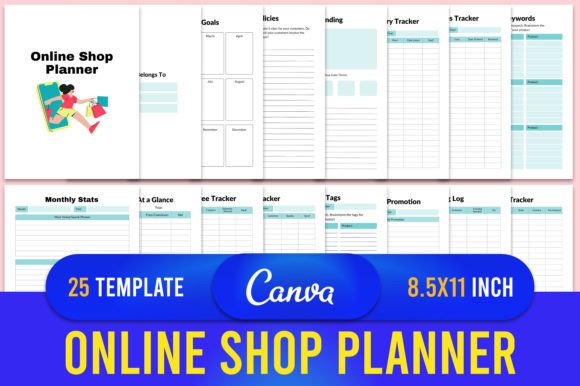
This 25-page template suite covers every facet of e-commerce management, organized into intuitive sections that flow logically from planning to analysis. Rather than juggling multiple apps and sticky notes, you centralize everything into one visual dashboard you can edit with a free Canva account. Here's the complete checklist of what belongs to the planner:
- Shop Inventory Tracker – Monitor stock levels at a glance with clean grid layouts.
- Shop Branding – Define your logo design guidelines, color palette, and brand voice in one dedicated space.
- Shop Policies – Draft and reference return, shipping, and privacy policies with a structured format.
- Monthly Goals – Set actionable targets tied to revenue, product launches, or audience growth.
- Product Keywords – Organize SEO terms that boost your shop's visibility across platforms.
- Shop Supplies Tracker – Stay ahead of packaging materials, labels, and office essentials.
- Coupons and Promotion – Map out discount codes, seasonal sales, and promotional calendars.
- Product Tags – Categorize and refine tag strategies that improve searchability.
- Order Tracker – Log purchases, fulfillment status, and customer notes without clutter.
- Expenses Free Tracker – Record business costs and categorize spending patterns.
- Shop Income At a Glance – Visualize revenue streams quickly through digestible summaries.
- Monthly Stats – Compare performance metrics month over month.
- Sales Tax Tracker – Simplify tax season with dedicated columns for rate calculations.
- Shipping Log – Document carrier details, tracking numbers, and delivery dates.
- Advertising Tracker – Evaluate ROI across ad campaigns and platforms.
- New Product Planner – Brainstorm, prototype, and schedule product development phases.
- Email Marketing Planner – Outline newsletter sequences, subject lines, and send dates.
- Revenue Goal and Estimate – Project earnings and adjust strategies accordingly.
- Return Tracker – Monitor refunds, exchanges, and common return reasons.
- To-Do List – Capture daily and weekly priorities with a minimalist checklist design.
- Vision Board – Curate imagery and affirmations that keep your long-term mission vivid.
- Notes – Unstructured space for spontaneous ideas and meeting takeaways.
Each template arrives as a ready-to-upload PDF, an editable Canva link, and high-quality JPEG files. The print dimensions lock in at 8.5×11 inches with no bleed, making it ideal for home printing, professional binding, or direct upload to Amazon KDP Kindle. The 300 DPI resolution and CMYK color profile guarantee crisp text and vibrant accents on paper.
Practical Applications Across Your Creative Workflow
Beyond basic organization, this planner supports wider design and branding activities. If you're crafting social media graphics for product launches, the planner's promotional calendar aligns your visual assets with scheduled campaigns. When developing new packaging design concepts, the supplies tracker ensures you have the right materials on hand. The branding section keeps your logo, typography, and color choices consistent across website and UI design updates.
Marketing Materials and Digital Content
An effective brand presence extends into email headers, Pinterest pins, Instagram carousels, and beyond. By referencing your Online Shop Planner Canva Template before creating these assets, you ensure every piece of digital content ties back to strategic goals—whether that's promoting a seasonal sale tracked in your coupons section or teasing a new product logged in your development planner. This integration sharpens visual communication and eliminates guesswork.
Editorial Layouts and Presentations
The monthly stats and income-at-a-glance pages double as visual aids for client proposals, sponsorship pitches, or personal quarterly reviews. Clean data presentation elevates your professional credibility, and because you can customize every element in Canva, you quickly adapt the color scheme and typography to match a pitch deck's aesthetic. Consistency between your internal documents and external presentations strengthens overall brand identity.
Editing Made Simple with Canva
One significant advantage is the effortless customization. You don't need advanced design software or layout skills. After purchasing, you receive an editable Canva link. Important: to keep the original file intact, open your Canva home, make a copy of the document in your own account, and edit that version. From there, adjust text, swap colors to match your palette, add your logo, or rearrange sections to fit your specific processes. The drag-and-drop interface means you can even incorporate additional creative assets like branded icons or photography.
How to Choose and Adapt a Planner for Your Shop
When evaluating any Online Shop Planner Canva Template, consider scalability and flexibility. Will the sections accommodate future product lines or seasonal shifts? Does the visual hierarchy make scanning intuitive during busy fulfillment days? Test how well the template aligns with your existing brand identity—the fonts, the spacing, the emotional tone. A template that reflects your aesthetic makes record-keeping feel less like a chore and more like a natural extension of your creative projects.
Prioritize readability. A gorgeous layout loses value if you can't quickly log an expense or locate a shipping address. Look for clear section headers, logical grouping of related tasks, and enough contrast between background and text. The 25 templates offered here maintain that balance, ensuring your daily operations run smoothly without sacrificing visual appeal.
Closing Thoughts on Design-Driven Organization
Thoughtful design choices matter far beyond customer-facing assets—they shape how you run your business from the inside out. An Online Shop Planner Canva Template gives you the structure to reduce overwhelm, the visual inspiration to stay motivated, and the professional polish that echoes the care you put into every product. When your planning tools mirror your creative standards, every entry reinforces your commitment to quality. Whether you print the pages and tuck them into a binder or use them digitally as a reference, you're investing in a system that elevates both your workflow and your brand.